Research overview on visual techniques, tools, and approaches for documenting modular synth patches. Modular patches are ephemeral — disconnect a cable and the sound is gone — so the community has developed a variety of methods to capture and communicate these configurations.
Historical Methods
Patch Sheets
The original documentation method, dating back to the 1960s. Don Buchla shipped large A3-sized pre-marked patch sheets with his 100 Series systems — printed representations of the front panel where you mark cable connections and annotate knob positions. Moog adopted a similar approach. The key limitation: they’re system-specific. A Buchla sheet is meaningless for a Moog system.
Block Schematics
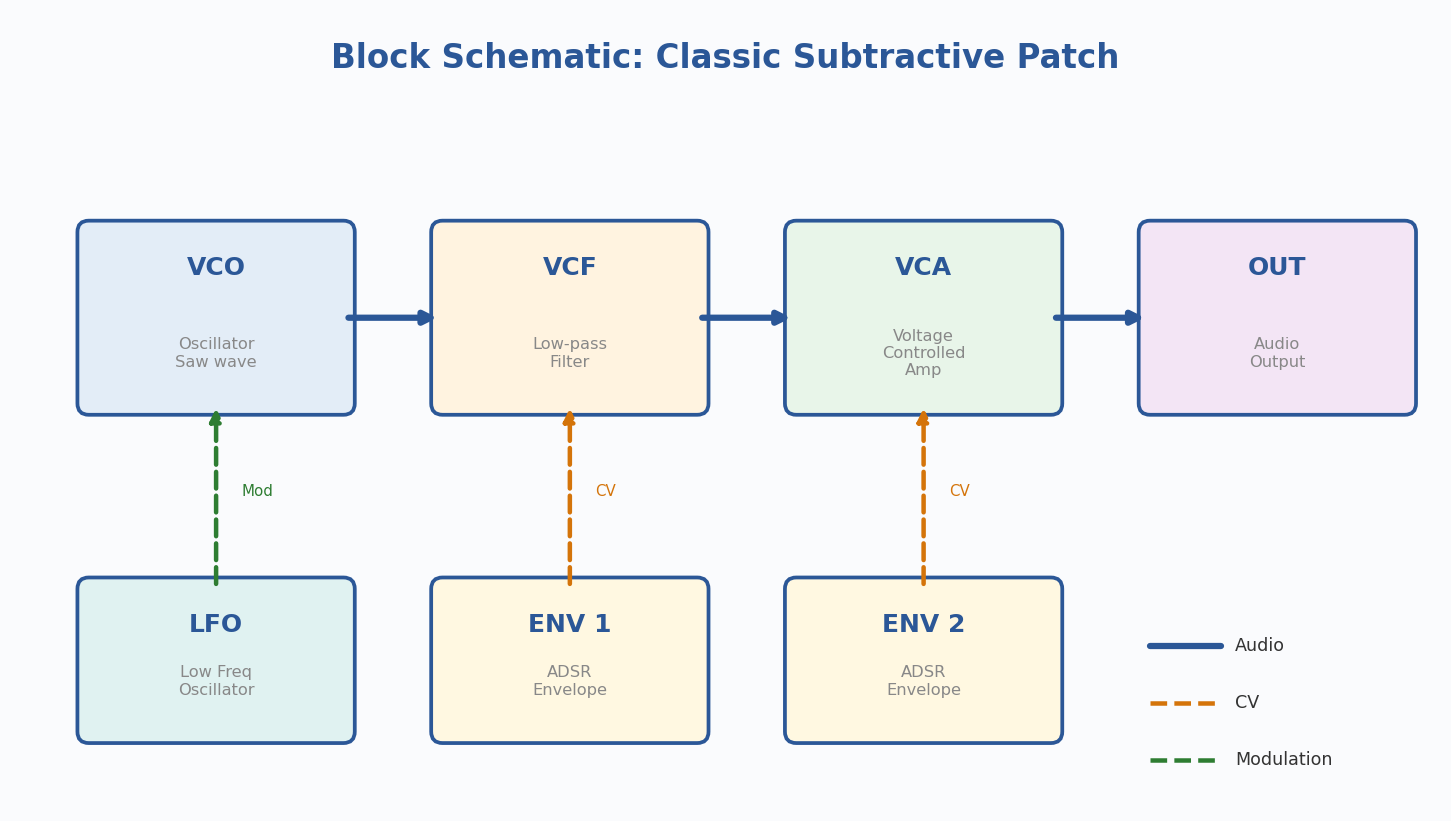
Allen Strange introduced a more portable notation in his 1972 book Electronic Music: Systems, Techniques, and Controls. Rather than mapping physical layout, he used flowchart-like graphics representing synthesis building blocks: oscillators, filters, amplifiers, envelope generators. Later dubbed “block schematics” by Rob Hordijk.
Modern Visual Techniques
1. PATCH & TWEAK Symbol System
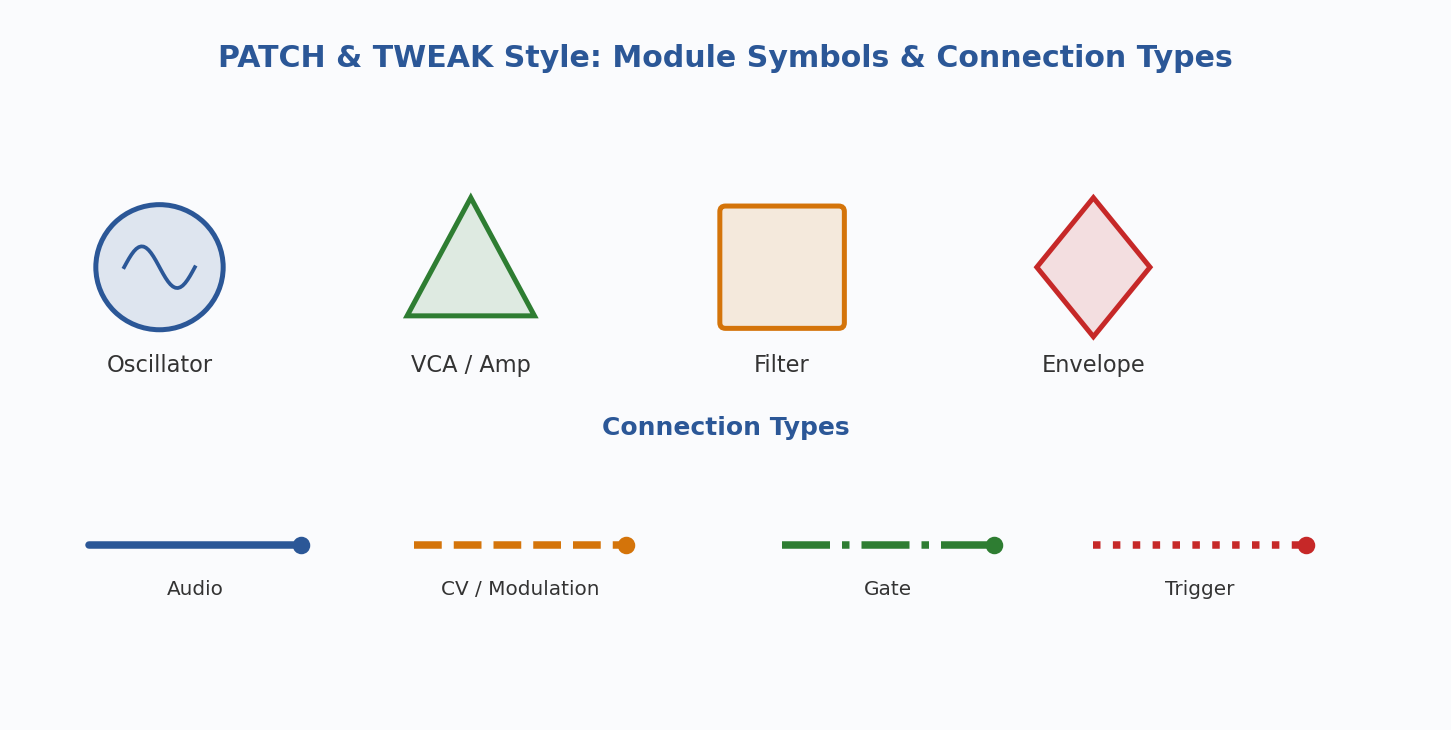
Developed by Kim Bjorn for the book PATCH & TWEAK, this is a standardized, module-agnostic visual language using symbols and color-coded connections. Released under Creative Commons.
- Distinct symbols for oscillators, filters, envelopes, LFOs, mixers, VCAs
- Color-coded connections differentiate audio, CV, gate, and trigger signals
- Optimized for learning and sharing between users with different systems
- Free to download from patchandtweak.com/symbols
Strengths: Universal, well-designed, community-adopted, free Limitations: Learning curve for the symbol set; less intuitive than a photo for quick recall
2. Patchbook Markup Language
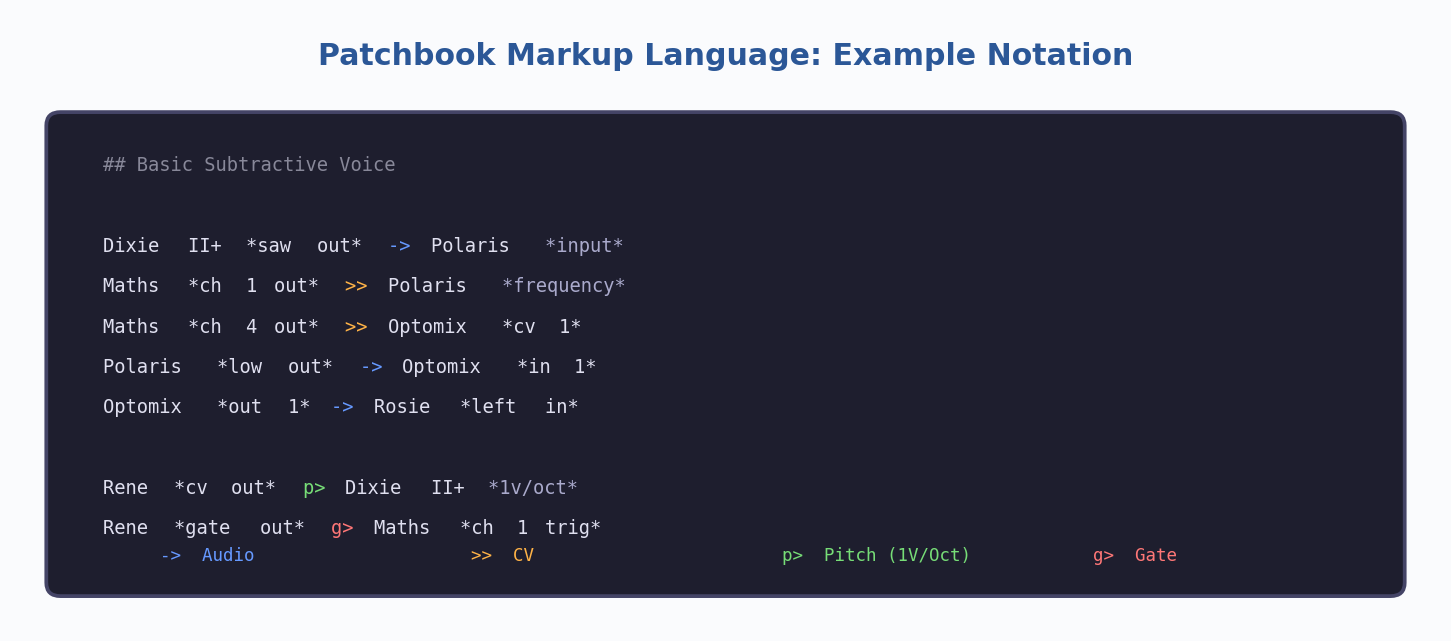
A text-based markup language designed to be both human-readable and machine-parseable. Write patches in plain text using simple connection symbols.
->for audio connections,>>for CV,p>for pitch,g>for gate- Can include knob settings and module parameters as annotations
- Designed as an open standard the community can build tools around
- Text files are lightweight, versionable, and easy to share online
Strengths: Portable, searchable, machine-readable, no special software needed Limitations: Not visual by itself; requires rendering tools for graphical output
3. Synth Patch Library (Online Tool)
A free web-based application with a visual patch schema editor, drag-and-drop functionality, audio upload, and community sharing features.
Strengths: All-in-one solution, visual editor, audio support, community features Limitations: Requires internet; patches live on an external platform
4. Photography and Digital Annotation
Photograph your patched system, then optionally annotate in a drawing app. Some users grab their rack layout from ModularGrid and overlay drawn patch cables.
Strengths: Fast, intuitive, captures physical detail, no learning curve Limitations: Hard to read with dense patches; not searchable
5. Patch Deck Cards
Created by Kim Bjorn and Chris Meyer — a physical deck of cards with tips, techniques, and patch ideas using a simplified signal-flow visual language. Brand- and module-agnostic.
Strengths: Tangible, inspiring, great for learning, portable Limitations: Fixed content; not a system for documenting your own patches
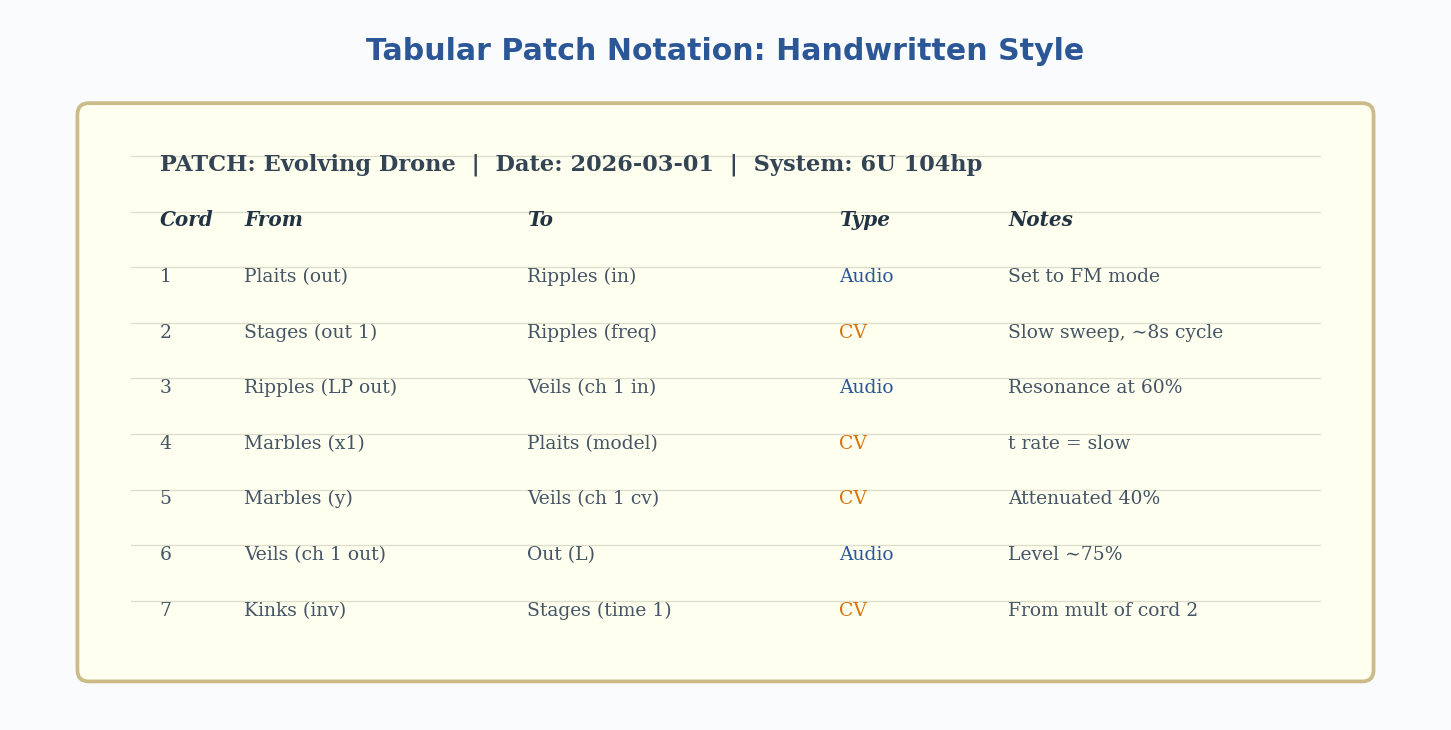
6. Pencil, Paper, and Tabular Notation
Many experienced synthesists prefer handwritten documentation. A common approach is a numbered table of cable connections. Can document a full 6U x 104hp system in about five minutes.
Strengths: Fastest method, zero dependencies, highly flexible Limitations: Not shareable digitally without scanning; no visual representation of signal flow
7. Video Recording
Recording the patching process creates a step-by-step tutorial for your future self. Captures the process, not just the end state.
Strengths: Captures performance techniques and process; rich medium Limitations: Time-consuming to review; hard to quickly reference a specific setting
The Unsolved Problem: Performance Over Time
Nearly all documentation methods focus on the static configuration of a patch. What they struggle to capture is the performance dimension: how the synthesist interacts with the patch over time — turning knobs, pushing sliders, sequencing changes. This temporal, gestural aspect remains one of the most difficult things to notate. Video comes closest but trades away quick-reference quality.
Comparative Analysis
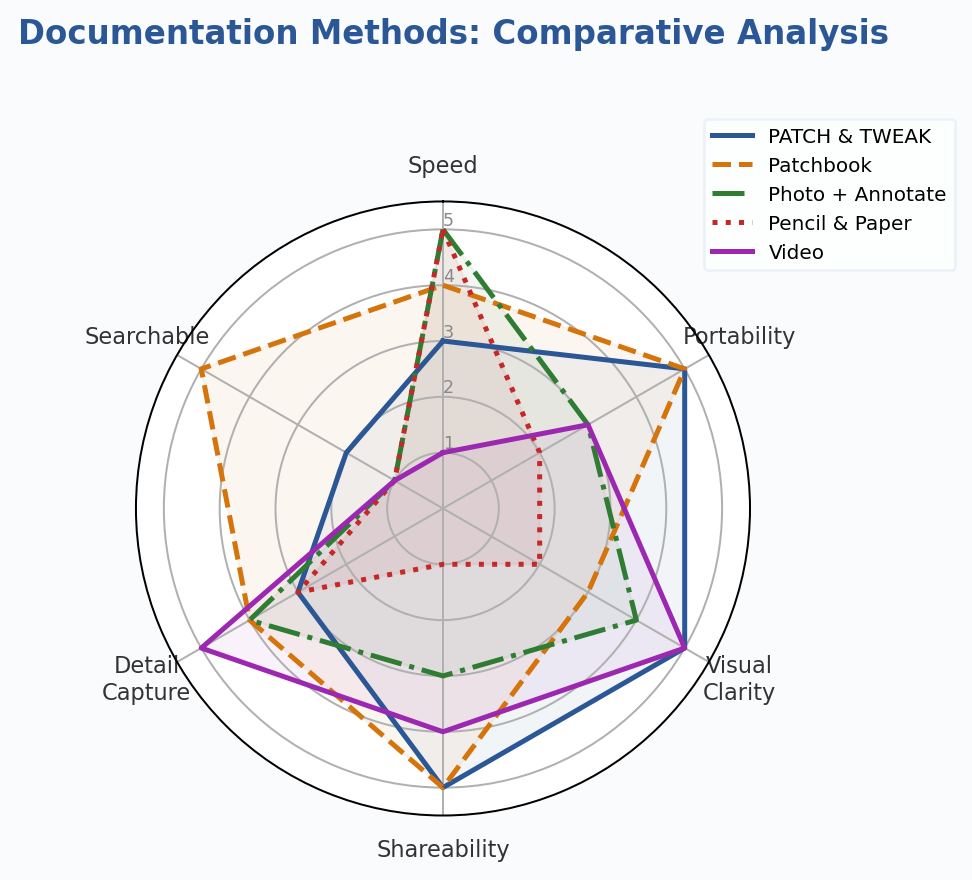
| Method | Speed | Portability | Visual Clarity | Best For |
|---|---|---|---|---|
| Patch Sheets | ★★★ | ★ | ★★★ | Single-system recall |
| Block Schematics | ★★ | ★★★ | ★★★ | Teaching & sharing |
| PATCH & TWEAK | ★★ | ★★★ | ★★★ | Community sharing |
| Patchbook | ★★★ | ★★★ | ★★ | Digital archives |
| Photo + Annotate | ★★★ | ★★ | ★★ | Quick personal docs |
| Pencil & Paper | ★★★ | ★ | ★ | Fast personal notes |
| Video | ★ | ★★ | ★★★ | Capturing performance |