Custom firmware for the centrevillage LilaC Repeater, built on the official 2.0 binary, lr_v2_0.bin. There is no source, so every change is a patch to the binary itself.
The current build is 2.0-EX6 Scope R2.
What it does
- Recording at unity. DRY sets the monitoring level only. Input is recorded at full level wherever the fader sits.
- Trimming on the faders. FDBK trims the loop start and SPEED trims the end, with nothing held. Hold FUNC for the original global feedback and tempo.
- Per-track speed. Hold one track button and move SPEED for a continuous 0.5×–2× multiplier on that track alone. Session-only — saved samples are untouched.
- Menu taps on release. So holding a track button for speed can’t trip a menu parameter first.
- Scope splash. An oscilloscope trace drawing
EX6in place of the original startup logo.
Download
lr_v2_0_EX6_SCOPE_R2_EXPERIMENTAL.bin — 387,600 bytes
SHA-256: fb89a9a8d5664debbb51481a794ceb90f1c991239a05a49310948c0f0c3aa005
Verify before flashing:
shasum -a 256 lr_v2_0_EX6_SCOPE_R2_EXPERIMENTAL.binAn unofficial modification of centrevillage’s LilaC Repeater v2.0 firmware, made by patching the official binary. Not a centrevillage release, not endorsed by them, and not tested on hardware. Flashing it may make a module unusable and may void your warranty. Shared for non-commercial use only.
LilaC Repeater · EX6 Scope R2
Changes from supplied official v2.0 firmware1 DRY · monitor only
2 FDBK · playback start
3 SPEED · playback end
4 T1–T4 · hold for track speed
5 OLED · live detail + EX6 splash

About 2 seconds still, then a 3-second particle dissolve.
Targeting, limits, and original behavior
- Trims use the edit track, otherwise the recording target. They snap to musical steps, cannot cross, and retain at least one step.
- FUNC + SPEED controls global tempo and affects all tracks. The original external-sync restrictions still apply. FUNC takes precedence over a held track button.
- Continuous track speed is an absolute per-track multiplier relative to global / recorded tempo. It changes pitch and speed in VARI; it does not add STRETCH pitch control. While playing, continuous speed changes become audible at the next playback clock boundary. While stopped, they apply immediately for subsequent playback.
- Native speed menu / MIDI edits, clearing a track, and loading / restoring a sample clear the temporary override. Empty, recording, and overdubbing tracks do not accept the new track-speed control.
- In playback detail, track-button menu taps act on release; standalone menu hold-repeat is disabled. Changing the displayed edit track does not itself redirect REC; pressing a track button in the main view still selects the recording target.
- Modifier-transition filtering prevents residual slider movement from leaking into the next function, as far as emulator tests establish — not a guarantee against every hardware glitch. Startup and load-generated slider notifications do not overwrite settings with the physical fader positions.
- Track level faders, audio jacks, and transport retain their original roles. DRY down plus all track faders down allows silent input recording. Recording sources that mix tracks still follow their existing mix rules.
- Unity recording gain means no digital attenuation from DRY, not automatic normalization. Set input recording level upstream.
Recording level
This is what started the project. On the stock firmware the DRY fader sets both the monitoring level and the level at which DRY material is recorded, so monitoring quietly gives you a quiet recording. In EX6 the recording is captured at full unscaled input level and DRY only controls what you hear. Set the level upstream instead.
Faders
The two faders trim the loop with no modifier held:
- FDBK — playback start position.
- SPEED — playback end position. Fully up is the sample end; sliding down brings the end earlier.
Full range is FDBK down, SPEED up. Holding FUNC restores their original functions:
- FUNC + FDBK — global overdub feedback.
- FUNC + SPEED — global tempo, 60–240 BPM.
Most of the work went into the modifier transitions. An earlier build, EX2, had a smoothing tail on FUNC release that audibly slurred the parameter as you let go of the button.
Per-track variable speed
Hold a single track button and move SPEED for that track’s continuous VARI multiplier, 0.5× to 2×, with 1× around the center. The gesture opens the track’s detail view and the multiplier updates live.
While playing, a speed change becomes audible at the next playback clock boundary. While stopped, it applies immediately for subsequent playback.
The setting is session-only. Saved sample metadata is untouched, and a native speed menu or MIDI edit, clearing a track, or loading/restoring a sample clears the temporary override. I’d rather not write an undocumented value into the on-disk format of a module I’m patching without source.
Menu taps inside the detail view act on release rather than press, so a tap can be told apart from the start of a speed gesture. Standalone menu hold-repeat is disabled for the same reason.
Scope splash
R2 is a cosmetic revision. The startup screen replaces the original 123×56 logo with an oscilloscope trace drawing EX6, then hands off to the module’s native particle dissolve and the 2.0-EX6 label.
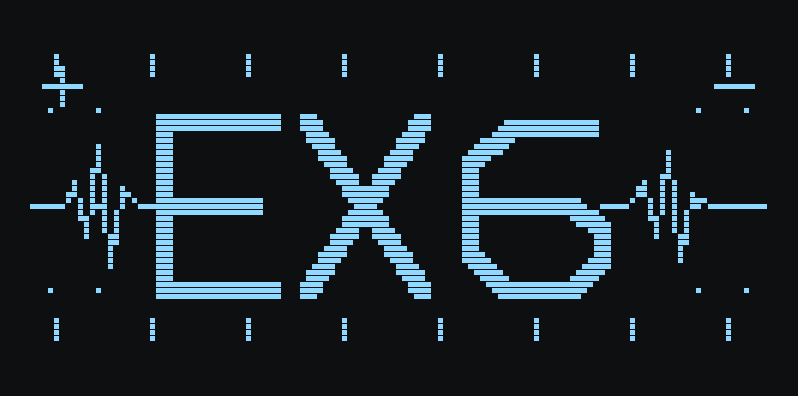
0x3e028. 1,011 lit pixels.